It has been a few days since I successfully defended my dissertation “On the Record: Understanding a Century of Congressional Lawmaking Through Speech and Vote Behavior” at the Institute for Analytical Sociology in Sweden. In the weeks preceding my dissertation, I have written a couple of reflection articles on the case, the theory, and AS background of my thesis. I explained lessons learned, how I view questions from before my thesis now, and so on.
But there’s one article which I knew I had to write, and I just realized I never did. Recently, someone asked on the Zettlr Discord whether they should fully commit to Zettlr for writing their dissertation. I wanted to link to this article, only to realize that it doesn’t yet exist. I had confused it with a lecture I gave shortly after defending at the other IAS (the Institute for Application Security in Brunswick, Germany) which I titled exactly like this article.
So, with a few months of (hopefully understandable) delay due to mental confusion, here it comes!
In this article I want to talk about how I wrote my entire thesis using only one (writing) application. Bear in mind that I have already written about the organizing principles like folder structure in another article, so I won’t focus on that here. Instead, I want to explain how the setup worked technically, with an emphasis on the part that I’m a quantitative sociologist and as such have to write a lot of code. If you’re interested in getting some inspiration for how to organize or structure your setup content-wise, please read this article.
What I want you to take a way from this article is two things: First, Zettlr is absolutely up to the task of writing an entire thesis, and so I can only recommend it to anyone out there who doesn’t want to write everything in LaTeX. And second, even if Zettlr ultimately fails (because no program is perfect), if you commit to Zettlr, you can use a wide range of resources to fix whatever issues you may face on short notice.
Writing a Dissertation: How I Used Zettlr
In the following, I want to introduce you to the technical setup I used to facilitate writing an entire 200-page dissertation using Zettlr. This section focuses on three parts: First the integration of an entire data analysis pipeline into my writing workflow; second the integration of export templates and custom layouts into the exporter; and lastly a bird’s eye view over the entire structure.
Integrating Data Analysis
The main issue I had to solve when it comes to setting up my PhD workflow was that I wanted to keep Zettlr strictly as a writing app. However, as a quantitative sociologist, I also needed to write code and run data analyses, and that I didn’t want to do that in Zettlr. So how could I integrate that with the task of writing up my papers?
To get started, I first created a set of folders – one per paper – in which I could place all my text. If you’re writing a monograph, I still recommend a set of folders – one per chapter. Each of these folders I turned into a project so that I could export them whenever necessary. (In Sweden, you have a series of intermediate examination seminars for which you need to provide the drafts as PDFs, so having a way to export them alone in one click was a real time-saver.)
Within these folders, I set up one file per (sub-)chapter – in my case the classical “intro-background-methods-results-discussion.”
At the same time, I created a folder elsewhere that I didn’t load as a workspace into Zettlr where all my code needed to go. Effectively, it was a huge .git-repository1 that I had constantly open in VS Code and RStudio. Within it, I created consecutive folders for each task, in the format ddd_description, where ddd was just an increasing number. The first digit was always 0 for purely exploratory analyses, 1 for analyses relating to my first paper, 2 for my second, and so on. The other two digits were simply incremental. The description was always one or more very short keyword(s) that helped me figure out which code was in what folder.
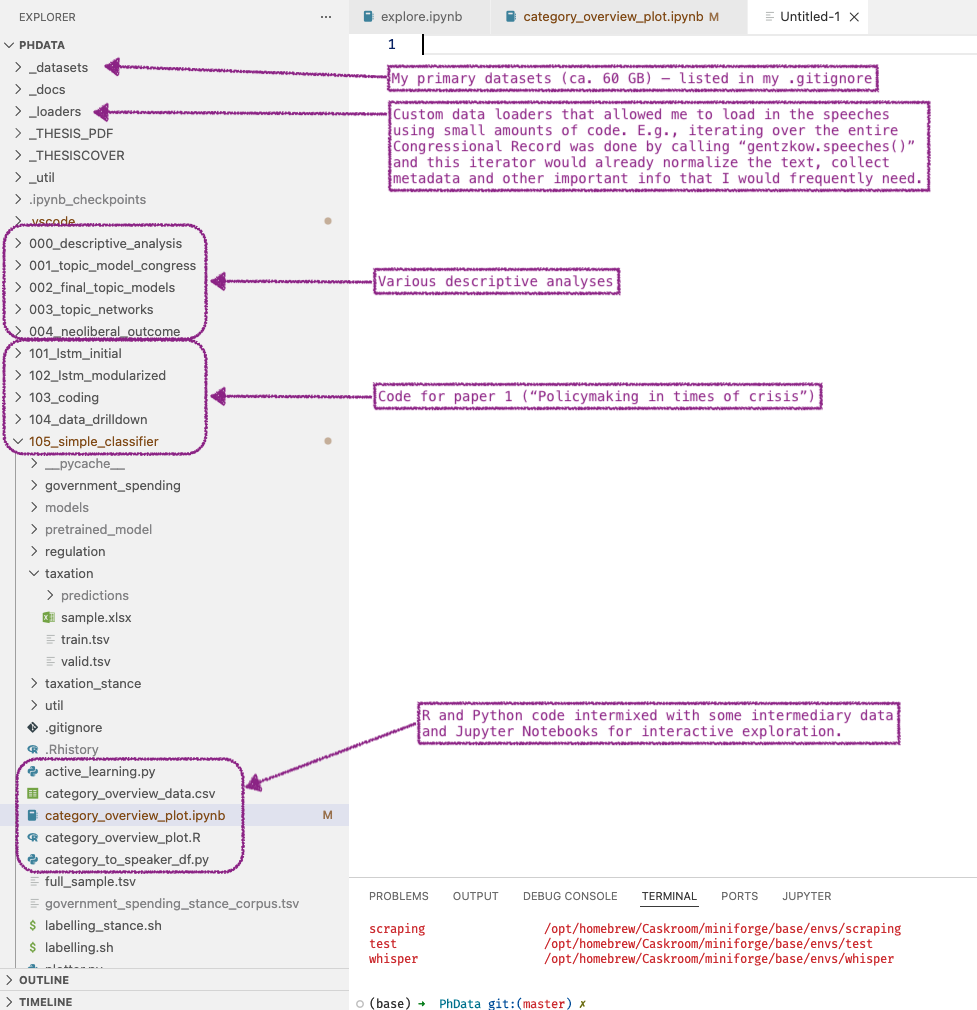
Next, I needed to somehow link my writing in Zettlr with the results of my data analyses. What helps is to recognize that the only link between analysis and writing are plots and tables. Your data analysis should produce some plots or tables, and those you need to include in your writing.
How I did that was relatively straight-forward: Whenever I produced a plot or table that would end up in a paper, I saved it to a file. Specifically, I saved it to the assets-folder within the corresponding paper project. So, for example, the path to my first paper folder that was loaded in Zettlr was /Users/hendrik/Nextcloud/PhD/Paper 1, and so I dropped the files into /Users/hendrik/Nextcloud/PhD/Paper 1/assets. Then, I dragged and dropped them into the text at the appropriate place.
One example is the following code that exports a plot I referenced in my third paper:
fig, ax = plt.subplots()
fig.set_dpi(1200.0)
ax.scatter(dem_xy[0], dem_xy[1], color = (0, 0, 1))
ax.scatter(rep_xy[0], rep_xy[1], color = (1, 0, 0))

# Annotate the points
for i, speech in enumerate(speakers):
  speaker = speech[0]
  x = speaker_xy[0][i] + 0.02
  y = speaker_xy[1][i] + 0.02
  ax.annotate(speaker, (x, y))

title = """Semantic Speech Centroids on July 2, 2025
House discussion, "One Big Beautiful Bill Act" (H.R. 1)
Dimensionality-reduction via MDS"""

plt.savefig("PhD/Paper 3 - Vote Defection/assets/fig_1_speech_centroids.png", dpi = 1200.0)
plt.show()
See how the code at the very end both saves the plot to a file in my Zettlr workspace, and shows it for quick inspection. Within my actual text, I could then easily drag and drop the figure into the text.
The benefit of this setup was huge:
- All my outputs from the analyses were readily available to reference in my writing.
- Whenever some part of my code has changed, I could just re-run the exporting code to overwrite the file. Each plot only had a single file, and so whenever I exported my papers for sending them out, they would always include the correct (=latest) plot (or table).
- It avoids context-switching. Either I had VS Code or RStudio open and would think about data structure, or how to improve an analysis. My brain could completely forget all theory or the framing of my paper and only focus on the data. Or I had Zettlr open and could exclusively focus on the theory or framing of my paper, and completely ignore how I ran the analysis.
Integrating Templates
The next big issue started to appear when I had to submit my work to journals. Usually, journals have their own style guide and expect any submissions to follow it closely. If you’re lucky, you get a LaTeX source file. If you’re somewhat unlucky, you get a correctly-formatted Word file. And if you’re really unlucky, you only get some vague instructions.
Luckily, the journal I submitted to (Network Science) offered a LaTeX template. The process applies to any kind of template, really.
I wanted to make the template available to Zettlr in a way that I could export individual files or entire projects with it (because I may very well submit another paper to the journal in the future). I also wanted to ensure that the template is generic so that I could share it with others. For that, I created a “template” folder and placed the template in there. The way I set everything up led to the comprehensive guide on submitting to a journal that you can find in the Zettlr documentation.
With a prepared template at hand, I could point a defaults file to it, and then export whatever I wanted from Zettlr using this specific template. So, whenever I chose “Network Science PDF” as an export target, the PDF would follow the Network Science style guide.
If you are interested in exploring how I modified the Network Science template, have a look at the repository here. If you plan on submitting to any Cambridge University Press journal (Network Science, Political Analysis, Political Science Research and Methods, Evolutionary Human Sciences, or Natural Language Processing), the template will work for you.
The Overall Structure
There were a few more things to integrate into Zettlr as a hub that I am skipping over here. This is because I already wrote extensively on them. If you’re interested in how I create and reference reading notes, read this article. And if you want to learn how to couple your Zotero library with Zettlr, read this documentation page.
To show you what the entire setup looked like at the end, here is a comprehensive diagram:
flowchart TD
    A["Literature (Books, papers)"]
    B[Reading Notes Folder]
    C[Paper Files]
    D[Statistical Code]
    E[Paper Assets Folder]
    F[Pandoc]
    G[PDF Export]
    H[Zotero]
    I[Library File]
    J[LaTeX Templates]
    K[Pandoc Defaults]

    A --> B
    B --> C
    D --> E
    E --> C
    C --> F
    F --> G
    H --> I
    I --> C
    I --> F
    J --> K
    K --> F
As you can see, whenever I read something, I created a reading note (within Zettlr) that I would then reference in my paper files (i.e., I looked at the reading notes to see what I could cite, and find arguments). At the same time, any output from my statistical code would end up in the corresponding assets-folders, also to be referenced in my paper files. Finally, all my citations are stored in a single, large CSL JSON file (currently ca. 1.6 MB large).
These three parts all went directly into the paper source code (read: the Markdown documents I wrote). Finally, whenever I exported a paper, this would actually run Pandoc under the hood, which itself referenced the various templates and defaults files I had to produce a PDF export.
The setup is quite complex, but it requires a one-time effort to set up and proves to be a huge time saver. In the end, it followed a few good principles:
- DRY (Don’t repeat yourself): This means that every file was unique. Instead of mindlessly copying back and forth files, I kept exactly one copy of each so that I never got confused what the most recent figure was that I needed to include in my writing. If I ever needed to reference a previous version of a file, I would have had the option to search the
githistory. But this has never happened once in the five years. - Modularization and separation. I kept everything logically separated from each other. My writing was entirely contained within Zettlr, my data analysis in VS Code and RStudio in a different folder, my library file is located at yet another place, and all my templates were also in a different folder. This way, I always knew where to head when I had to adjust something. It also ensured that I didn’t have frequent context-switches while working. When I was writing, it was impossible for me to accidentally stumble upon a template and thus get mentally distracted. Instead, when I wrote, I could focus only on that. When I improved my analyses, I wasn’t getting confused by my writing. And so on.
- Responsiveness: We all know this issue. We’re ready revising a paper, and because we’re good students we are done a few days before the deadline. However, we suddenly get an email from a colleague who did indeed manage to provide feedback on it after all. Unfortunately, they did find a major flaw in your analysis. What do you do? Well, I’ve had plenty of such situations, but the way this setup worked, it was extremely efficient to go back to the analysis, find and fix the error, re-run the code, and simply re-export the paper. The setup was incredibly fast and responsive in this sense. It maximized the time I could spend working on the contents of the paper, and minimized the time to, e.g., export it.
In fact, this setup was so tuned at the end that fixing various parts across all my papers took me mere hours instead of weeks. Towards the end of the dissertation, it worked extremely well, and I even started to generalize this setup for my Postdoc time.
Where Zettlr Failed: Last-Minute Thesis Export
As I approached the defense date, suddenly my calendar filled up quite a bit with tasks I had to do. I had to get in touch with our library to request an ISBN for my dissertation, I had to contact my university’s printing office to set up a timeline, retrieve the test-print, and submit the final proof of the dissertation. This means that my weekends suddenly also filled up, and I lacked time to work on Zettlr itself.
Initially, I thought that what worked with individual papers of my dissertation should also work for the entire dissertation: Instead of exporting single papers, just turn their containing folder into a project, and export all of them at once.
However, there were a few issues with this:
- Since my dissertation was cumulative, the papers needed to be standalone, even if they ended up being bound into a single book. This means that things like bibliographies couldn’t be shared between them, and footnotes needed to start at
1every time. - I needed to add a few additional things into the mix, such as an abstract in both English and Swedish, or an acknowledgements section, which was a separate file. This also includes additional metadata such as an AI and funding statements.
- Each paper/essay/chapter needed to start with a divider page featuring a large ornament.
- Despite all four essays (introduction + my three papers) being standalone, the page numbers needed to be consecutive from start to finish.
Some of these issues only require a bunch of Pandoc settings, so they weren’t insurmountable. A dedicated reference section for each essay was more tricky. And these ornament dividers had to be implemented in LaTeX, so I couldn’t think of a clever way to include them.
Add to all this the fact that the original LaTeX template of my university, while comprehensive, was in no way compatible with Pandoc. Due to the extensive amount of custom elements that had been implemented, it was also very difficult to “template-ize” it to use it with Pandoc.
So I faced a choice: Either spend the majority of my – at that point precious – time forcing this beast of a template into Zettlr’s structure, or just stick with LaTeX entirely and have more time to proofread my thesis before sending it to the printing office. I opted for the latter option.
First, I adjusted the LaTeX template a bit to see that it would work. I then proceeded to insert all metadata and information that wouldn’t change anyhow (such as the ISBN). Next, I prepared TeX files for the acknowledgements (which essentially consisted of mostly plain text, so there isn’t really a difference between Markdown and LaTeX, and I could just copy and paste my acknowledgements from the Markdown document), and the abstracts.
After that work had been done, I needed to somehow get my papers into the mix. However, I knew that I would have to adjust some of the text, so if I were to simply export all my papers to LaTeX once, it would be a pain to, e.g., adjust the citations. Also, it would violate the DRY principle, since then I suddenly would have two copies of the same text lying around, making adjusting both even more tedious.
So I opted for a hybrid approach. I kept my papers in Zettlr. However, I sidestepped Zettlr’s internal exporter, and instead created a makefile that would just run Pandoc directly on the files. To do so, I went with the most stupid, but working approach to just verbosely write everything out. Here’s how it looked:
@echo Compiling kappa ...
pandoc -f $(PANDOC_READER) -t $(PANDOC_WRITER) -o $(KAPPANAME) \
$(PANDOC_OPTS) --resource-path="$(KAPPADIR)" \
"$(KAPPADIR)/01 - Introduction.md" \
"$(KAPPADIR)/02 - Policymaking and Sociology.md" \
"$(KAPPADIR)/03 - AS and CSS.md" \
"$(KAPPADIR)/04 - Politics in US Congress.md" \
"$(KAPPADIR)/05 - Policymaking in US Congress.md" \
"$(KAPPADIR)/06 - Computational Text Analysis.md" \
"$(KAPPADIR)/07 - Ethical Concerns.md" \
"$(KAPPADIR)/08 - Summaries.md" \
"$(KAPPADIR)/09 - Conclusion.md" \
"$(KAPPADIR)/10 - Outlook and Future Research.md"

# Repeat this for all four papers
The “name” and “dir” variables simply held the source folders and my wanted output filename. To configure Pandoc required a bit more code, so I collected all arguments I would need at the top of the file:
# Bibliography file for Pandoc
BIBFILE = /path/to/my/library.csl.json

# Base dir for all papers
BASEDIR = /path/to/paper_dir

# Pandoc reader and writer properties
PANDOC_READER = markdown+mark
PANDOC_WRITER = latex
# Options for Pandoc (split up into multiple variables)
CITEPROC = --citeproc --bibliography "$(BIBFILE)" --csl apa.csl
# DEBUG: I want to use --file-scope=true, but can't because that will mess with the placement of the `#refs` special references div.
PANDOC_ARGS = --top-level-division=section --table-caption-position=above
PANDOC_OPTS = -F pandoc-crossref $(CITEPROC) $(PANDOC_ARGS) --template=chapter.shim.tpl.tex
As you can see, instead of creating a defaults file (which I could have done, now that I think about it), I provided everything directly as CLI flags.
Also, that “Debug” statement you see there? Well, that was an issue with Pandoc I couldn’t solve ad-hoc. I could’ve actually reduced the exporting code by quite a bit if that bug didn’t appear. But I had to just repeat the same exporting code four times over, and in the end, it wasn’t too big of a deal, so I stuck with it.
Note also the Pandoc reader
markdown+mark. This extension is enabled by default when you export with Zettlr since a few versions, because it turns out it’s quite good to highlight sections you need to look at again in yellow, even in a final proof. Also, note that this command enabledpandoc-crossref, which I needed to cross-reference my plots and tables. Again, this is a feature I implemented in Zettlr before finalizing my thesis because it turns out to be quite useful. This is how most features have made it into Zettlr in the past five years: Because I literally faced this issue and decided to solve it.
At this point, I had a one-line command that would trigger an export of all my essays into LaTeX files. Great! To make the papers fit stylistically into the entire template, I created a new LaTeX template, chapter.shim.tpl.tex. It was very basic:
% Minimal Pandoc-compatible template to render a single paper into a chapter
% using the YAML frontmatter title property as chapter title.
$if(essayno)$
\orndivider{$essayno$}
$endif$

% From the memoir manual (p. 77):
% \chapter[⟨toc-title⟩][⟨head-title⟩]{⟨title⟩}
% ...where
% * toc-title: Table of Contents-Title
% * head-title: The title displayed in the head of the section
% * title: The displayed actual title.
$if(subtitle)$
% ToC: "Title. Subtitle"
% Head: Just the (short) title
% Chapter page: Title, and then small just the subtitle
% NOTE: title_separator is a quick hack because I need a separator in one case.
\chapter[$title$$if(title_separator)$$title_separator$ $else$ $endif$$subtitle$][$title$]{$title$ \\%
\vspace{10mm}%
\fontseries{m}\selectfont\small{\textsl{$subtitle$}}}
$else$
\chapter{$title$}\label{chapter:$title$}
$endif$

$if(author)$
\begin{center}
  $author$
\end{center}
$endif$

$if(abstract)$
\begin{abstract}
$abstract$
\end{abstract}
\newpage % Enforce a new page if the abstract goes too long.
$endif$

$body$
Again, a few things to note:
- The divider page was only required for my three essays, but not the introduction, and so I opted again for a somewhat dumb solution: Simply set the YAML front matter property
essaynowhich was simply 1, 2, or 3 depending on the essay, and unset for my introduction. The command\orndividerwas a completely different kind of beast and hides about 100 lines of LaTeX code (that were fortunately shipped with the template, so I didn’t have to write that myself). - The “NOTE” comment hints to another issue: Theses at my institute usually have the form “Title. Subtitle,” but Pandoc’s template syntax cannot tell me whether the title might already end with a punctuation mark. It did so in two cases, but not in a third case. So, again a very dumb solution: Another YAML front matter property that allowed me to specify a title separator if needed.
- The template is merely a “shim,” and leaves out most of what LaTeX actually needs to produce a standalone file. This is because those files were not intended to work standalone, but to be integrated into the larger template itself.
In the end, including all four works into the thesis PDF was as simple as telling LaTeX to load them:
% Include your chapters here
\include{kappa}
\include{paper1}
\include{paper2}
\include{paper3}
Finally, I just needed one more command to “knit” everything together:
xelatex -interaction nonstopmode -halt-on-error -file-line-error liuthesis.tex
From then on, everything else was just touching up the template where necessary, and improving the actual text. Whenever I changed anything in my text, I just had to run two commands to turn my papers into LaTeX files, and to produce the thesis PDF.
Shortly before the deadline to send the thesis to the printing office, I also realized that it would be my duty to produce what the Swedes call “spikblåd.” The spikblåd needs to include the thesis title, abstract, name of the opponent, and the location of the public defense. It turns out that the thesis template actually came with that thing, and whoever created the thesis template already thought ahead: The spikblåd would simply pull in the information that I already had provided in the first step to the thesis template. So all it took was to run another command:
xelatex -interaction nonstopmode -halt-on-error -file-line-error exhibit-page_spikblad.tex
Et voilà! It did indeed take quite some time to get this pipeline going, but what I wanted to show you with all of this is that if all things break apart, the open nature and interoperability of Zettlr ensures that anyone with some technical knowledge (or who knows someone with technical knowledge) can quickly break out of Zettlr to fix things Zettlr can’t handle by itself.
And you won’t even have to use LaTeX. The process to export everything to Word and then adjust a Word document would look very similar to this one.
Final Thoughts
Lastly, a few words on a fact that I never really reflected upon: One big benefit I had throughout this entire time was that I quite literally would “invent the universe to make apple pie.” Instead of choosing some existing piece of software and adjusting my workflow so that it works for me, I could quite literally adjust my software so that it fits into my workflow.
Over the past five years, I have tremendously changed how Zettlr works in an attempt to make it fit snugly into my workflow. Whenever I encountered issues where I would need some functionality to work frictionless, I would sit down on the weekend and make that feature happen.
I realize that this is a big privilege that only a few people enjoy. Now that I am in my Postdoc-phase, you can expect me to further refine the app to work more generally with academic workflows beyond the dissertation. However, this also means that I won’t be as obvious to potential friction in a PhD-student’s workflow as before.
I want to rephrase this as a call to action: If you’re an undergrad, graduate, or doctoral student, and encounter an issue where you need to do something, but Zettlr does not possess this feature, suggest it! I (and all the newly arrived contributors) can only implement what we know of. There is only one requirement: Your issue must be applicable to a few more people than just yourself. But I am very confident that most of your problems aren’t unique to you – at least not when it comes to writing a dissertation. So please help us make Zettlr even better for the next generation of students!
I was curious and checked: even without the datasets (circa. 60 GB in size), the
.git-repository alone – that is: mostly just text and plots – clocks in at 667 MB. A real chonker I got there. ↩